Permissions in Travelmesh
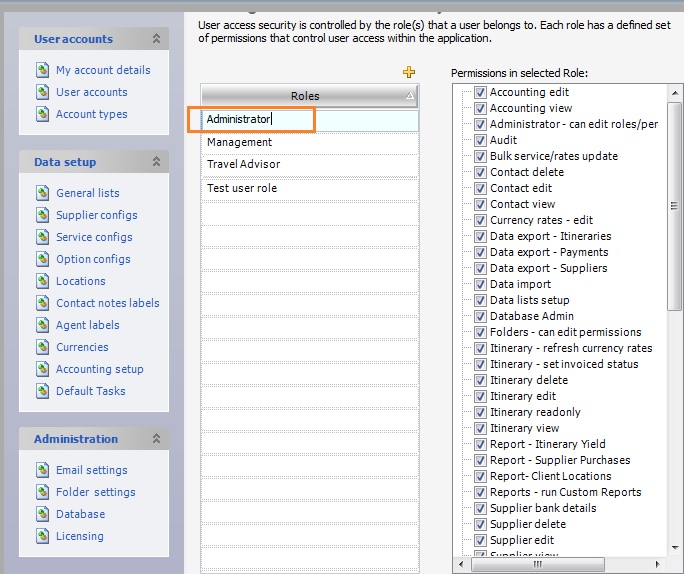
This doc will help you understand how permissions are set up in Travelmesh. The three default roles configured in Travelmesh are Administrator, Management and Travel Advisor. Additional roles can be added to this list. This can be done by performing the following steps:
- Go to Tools > Setup > Account Types.
- Click the yellow plus
 to add a new Travelmesh Role.
- The Administrator role, by default is assigned all the permissions.
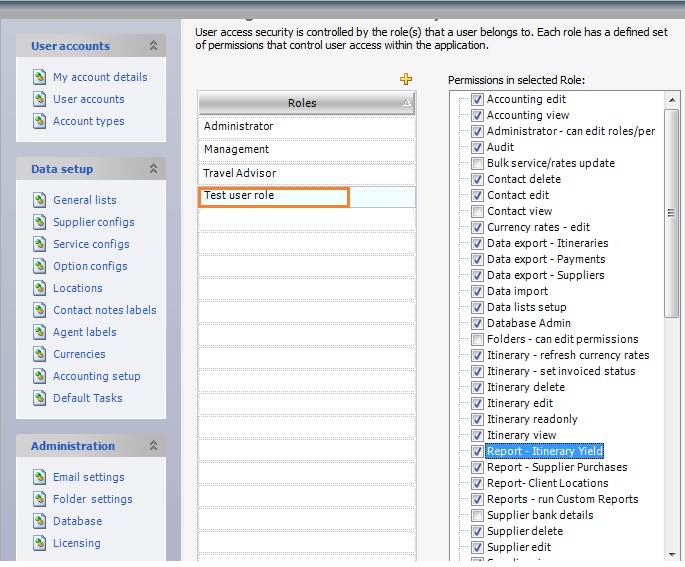
- The existing roles, such as the Travel Advisor role can be restricted to fewer permissions. For example, Travel Advisors may only be given permission to add, delete or edit contacts and itineraries and additionally run reports.
- Whereas the Management Role can be denied certain permissions such as deleting an itinerary, editing folder permissions and so on.
- Assign permissions to the newly created Role by enabling checkboxes present in the Permissions in selected Role workspace.
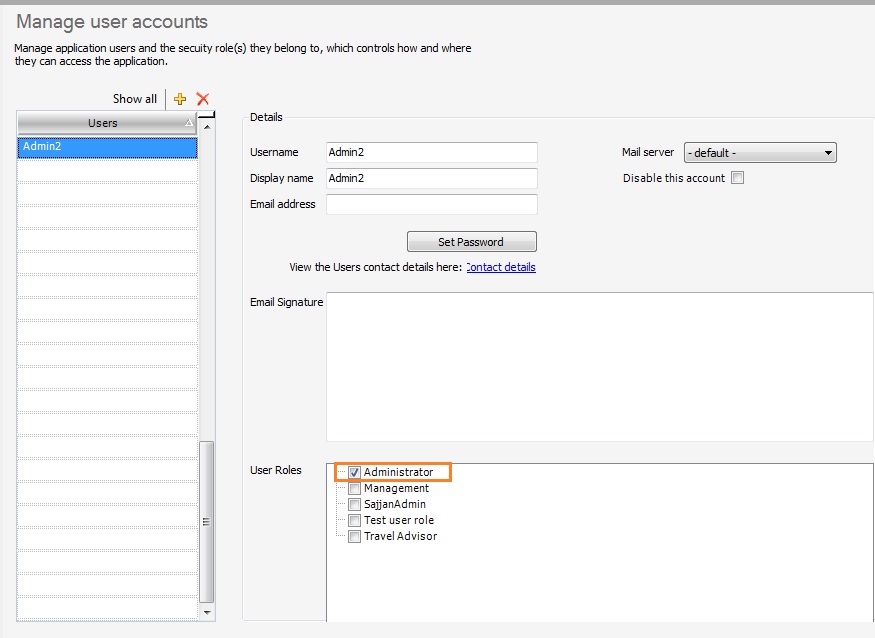
- Travelmesh highly recommends that there be at least two users with full administration rights to the database, in case one of them is on a leave or is absent. So to add the second user to be assigned the Administrator role. Go to Tools > Setup > User accounts.
- Click the yellow plus to add a new user, say Admin2.
- Next, we assign a user role to the new user. Under User Roles, enable Administrator as the role.
- As the Administrator role is configured with all permissions enabled, the Admin2 user is assigned all the permissions.
The following table provides a brief description of the different permissions available in Travelmesh. The table explains the scenario when the permission is disabled (no tick) for a user account roles….
| Feature | Description |
| Accounting Edit | Cannot Export Accounting Data |
| Accounting View | Cannot view Accounting data |
| Administrator – can edit roles | Cannot view/edit roles or permissions |
| Audit | Cannot open Audit Trail |
| Bulk Service/rate update | Do not have access to bulk update supplier rates |
| Contact Delete | Cannot Delete a Contact |
| Contact Edit | Cannot open a Contact to Edit Cannot add a new Contact |
| Contact View | Cannot view Contact |
| Currency Rates edit | Cannot edit currency exchange rates |
| Data Export Itineraries | Cannot export Itineraries |
| Data Export Payments | Cannot export Payments due |
| Data Export Suppliers | Cannot export Supplier |
| Data Import | Cannot Import Suppliers/Contacts |
| Data lists Setup | Do not have access to menus under Tools-> Setup-> Data Setup |
| Database Admin | Do not have access to menus under Tools-> Setup-> Administration |
| Folders – Can edit Permission | Cannot set folder permission |
| Itinerary – refresh currency rates | Cannot refresh exchange rates |
| itinerary – set invoiced status | Can set Invoiced Status |
| Itinerary Delete | Cannot delete an Itinerary |
| Itinerary Edit | Cannot edit Itinerary Cannot add new Itinerary |
| Itinerary Ready Only | Cannot set Itinerary to Read Only |
| Itinerary view | Cannot open Existing Itinerary |
| Report Itinerary Yield | Itinerary Yield report not visible |
| Report Supplier Purchases | Can generate Supplier Purchases report |
| Report Client Locations | Client Locations report not visible |
| Reports run Custom Reports | Cannot run Custom Reports |
| Supplier Bank Details | Cannot edit Bank Details |
| Supplier Delete | Cannot delete Supplier |
| Supplier Edit | Cannot edit Supplier Cannot add a new Supplier |
| Supplier View | Cannot open Supplier |
| User Accounts Setup | Only access to Tools->Setup-> My Account Details |