The Extras List
The new Booking Type list provides a choice to add new fields throughout the Travelmesh application. There are four new Booking Type lists. The data loaded under each list appear as drop-down options in several sections within your app.
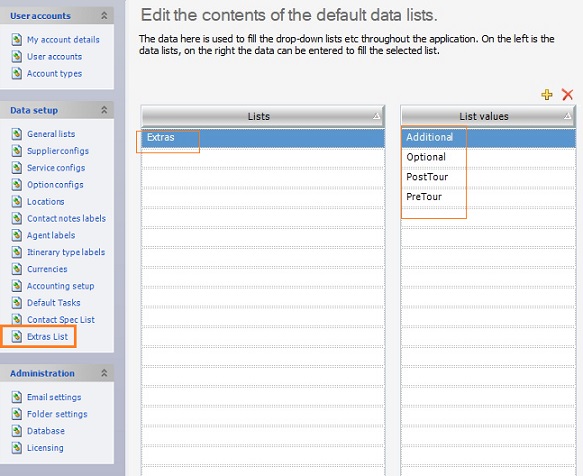
Extras is the first Booking Type list. The Extras list lets you categorise your Bookings into one of the four default options:
- Pre Tour
- Post Tour
- Additional
- Optional.
Accessing the Default List Value
You can access the Booking Type list to view the List values available as drop-down options. To update categories to Extras’s default list values:
- Navigate to Tools > Setup > Extras List.
- Select Extras and under List values, click the
 icon to add new values which will be available as drop-down options.
Note: You’ll see the Booking Type 1 list configured as Extras. To configure the other three Booking Types, head to Booking Labels in the Setup area.
- To delete a value, click the
 icon.
Categorising your Bookings
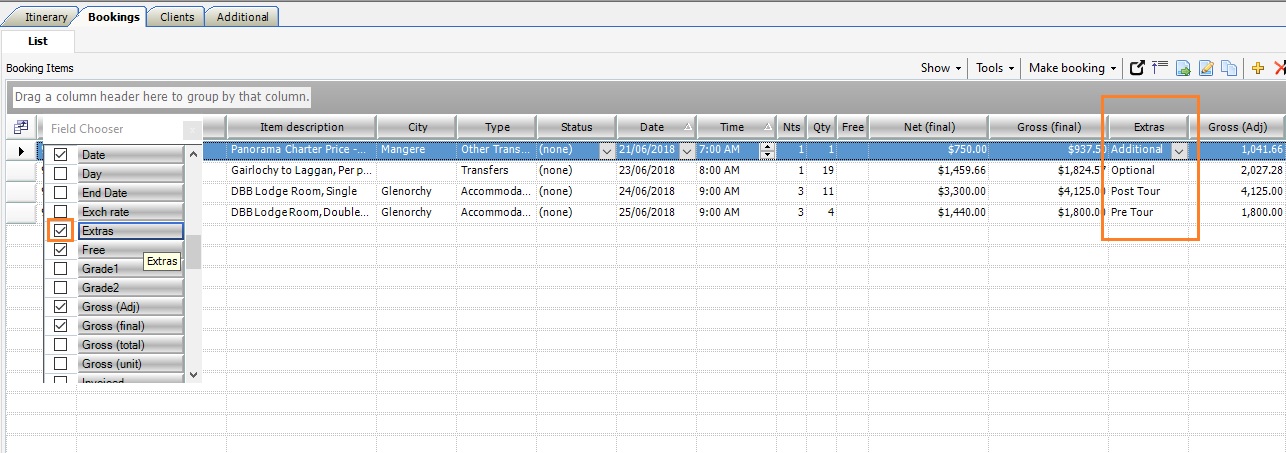
One of the places you’ll see the Extras field is the Bookings List tab on an itinerary. To categorise your booking:
- Open an itinerary and head to the Bookings List tab.
- Enable the Extras field by selecting the Field Chooser
 in the top left corner of the Bookings List tab.
- Assign a relevant category to your booking from the drop-down menu.
Click to enlarge image
Note: To personalise the fields you view in the Booking List Subtab select the Field Chooser . To access the Extras field the first time, enable it through the Field Chooser.