Online Hosting
The Travelmesh shared online file server / network drive is used for hosting The Travelmesh Database and the TourwriterData Folder
The Travelmesh Database is the database Travelmesh users access. It holds Supplier, Contact and Itinerary information.
The TourwriterData Folder is a collection of folders where Travelmesh images, report templates and emails are stored. This is held in a separate location to the Travelmesh Database.
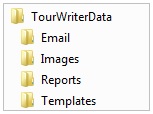
Email folder – used to store a copy of booking request e-mails sent by users to Suppliers, provided you have the applicable tick-box selected at the time you send your booking request from Travelmesh to the Supplier.
Images folder – used to store Supplier images used for Quotations, Itineraries and any other documentation, with image content, produced from Tourwriter.
IMPORTANT – Before Travelmesh users can start attaching images to the Travelmesh Database, ensure that a good folder structure within the Images folder has been established. We recommend making it the same as your Suppliers folder structure in Tourwriter.
Reports folder – used to file custom Report files as report development takes place
Templates folder – used to file custom Email or Accounting export templates.
Instructions on how to save files to these locations will be provided to you during the Travelmesh Implementation process and/or as report development occurs.
Advantages of Hosting the Travelmesh Database and TourwriterData folder Online
- Travelmesh Support ( e.g. troubleshooting / reports testing / technical assistance) can be more thorough and effective.
- Your Travelmesh database is backed up every 24 hours. However, if you if you wish to sync your online data with the data in the backup every 10 minutes, please reach out to the Support team. The servers are managed by our professional staff located in different time zones to ensure uninterrupted service.
- Availability of Travelmesh online features such as Supplier Auto Confirmation and Supplier Invoice Upload (ask your Customer Success Executive for details).
- Client can download their TW database backup from our Server if they need them for their own purpose. However, this will be chargeable.
IMPORTANT: We can only support online hosting with My Secure Backup .
Offline Hosting
Travelmesh users can choose to host their Travelmesh Database and the TourwriterData folder offline.
Single Travelmesh User
If only one staff member will be using Tourwriter, the Travelmesh Database is set up on that user’s computer. The TourwriterData folder can also be set-up on their computer (e.g. on the C Drive).
Alternatively, if there might be the possibility of more staff using Tourwriter, the user may want to consider setting up Travelmesh on a server.
Multiple Travelmesh Users
If more than one staff member will be using Tourwriter, both the Travelmesh Database and TourwriterData folder must be held in a shared location that all staff can access e.g. on a server.
- If installing the Travelmesh Database offline, we recommend that the Travelmesh user engage the assistance of an IT Administrator if they require help and support setting up and maintaining their Travelmesh backups, their computer or their network.
- If Travelmesh assistance and training is required, contact support@travelmesh.com. Please note that if the Travelmesh Database is hosted offline, Travelmesh does not provide technical help for server or network issues, for example, but does provide support for the Travelmesh Application itself.
Backups
Backups must be performed daily if hosting the database offline on your server. If hosting the Travelmesh Database and TourwriterData folder online with Travelmesh all backups are performed automatically.
Backups – If Hosting Travelmesh Offline
If the Travelmesh Database is hosted offline, it is the responsibility of the Travelmesh user to backup the database once each day. We recommend that this takes place at the beginning or end of the day, and not while Travelmesh is in use by any other staff members.
One person should be responsible for performing a TW backup each night. The backup can be made either on Travelmesh on the server machine – or from the Travelmesh user’s own PC. Either way, Travelmesh saves a copy of each backup file to the nominated file as below.
If the TourwriterData folder is hosted by the Travelmesh user, it is the responsibility of the client to backup the folders once each day. If in any doubt, we recommend that a dedicated IT Administrator is used to assist with this.
Backup Instructions
- Open Tourwriter
- Go to Tools > Setup > Database
- Select a file path where the Database will be backed up to
- Tick to add a date/time to file names if required
- To perform a backup, click the backup button
- The last backup file and last backup date are displayed in this window.
- The backup file path will be pointing to a location on your server. For multi-user offline clients where Travelmesh is installed on the office Server, in order to access the backup (.bak) file you will need to locate this file on your Server computer.
- If you are a one-user and have installed Travelmesh on one PC, that computer is also your Server. You will be able to locate your .bak file on your PC’s C: Drive.
- We recommend that a copy of the backup file is copied across to an external hard drive or USB stick for safe keeping.
If you are required to send a copy of your .bak file to a Travelmesh staff member, please zip/compress the file before emailing it, to reduce the overall file size. You can do this by right clicking the filename and selecting Send to > Compressed (zipped) folder.