Travelmesh Classic Docs

Account Types

/Getting Started / Setup / User Accounts / Account Types

Account Types

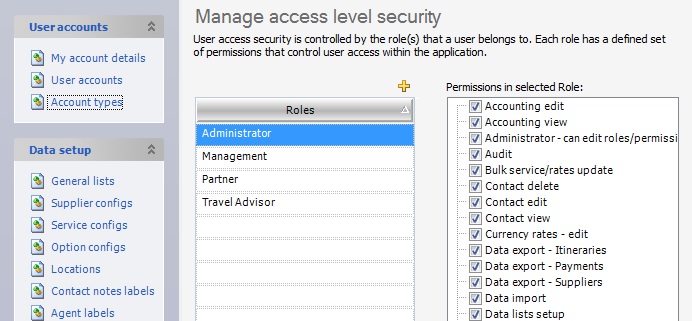
User Roles are the roles people play in an organisation. Each User Role has set Permissions associated with that Role. The specific Permissions that are enabled (ticked) determine which information they can access within Tourwriter. To learn what each permission denote, please refer to the Permissions in Tourwriter article.

The default Roles are;

  1. Administrator
  2. Management
  3. Travel Advisor

These can be overwritten.

To add additional User roles click on Account types (shown above) to view the available Permission options. You will need to look at and review the Permissions for Management and Travel Advisor roles and select appropriate permissions.

IMPORTANT – Administrator should always have full access (i.e. ticks next to all the Permissions options).

Tagged: setupaccountaccount typesrolespermissions

Related Articles

  • Securing Financial Information

  • Permissions in Travelmesh

  • My Account Details

  • User Accounts

  • What Next?

Index

  • What’s New
  • Getting Started
    • Implementation
    • Installation
    • Setup
    • Importing Data
  • Travelmesh Help
    • Management
    • Navigation
    • Contacts
    • Suppliers
    • Itineraries
    • Publishing / Reports
    • Additional
    • Travefy & Travefy Mobile App
  • Travelmesh Resources
    • Travelmesh Webinars
    • Travelmesh Videos
    • Travelmesh Templates
    • Travelmesh Reports
  • Technical Support
    • My Secure Backup User Guide
    • System Requirements
    • GoToMeeting
    • Troubleshooting & Error Messages
    • FAQs

Contact Travelmesh

Get to know us better

Email

Support: support@travelmesh.com

© Copyright , Travelmesh